 By Ethan Brooks
Updated November 2026
If you are looking into virtual net metering solar, the first thing to figure out is how your utility will track the power your system produces and the power you draw from the grid. In a virtual net metering arrangement, a solar array is often not physically connected to the building it credits. Instead, the utility or a metering system assigns generation to your account. That makes accurate, well-documented measurement more important than it is with a simple on-site net meter. The devices below are the kinds of monitors, bi-directional meters and irradiance tools that homeowners and installers commonly use to check production, verify import and export, and keep records for billing disputes. Our selection weighs published specifications, brand reputation, and patterns in owner feedback about accuracy, setup and software support.
Our top picks at a glance
- 1
 TOP CHOICEBest overallEmporia Vue 3 Home Energy MonitorView on Amazon
- 2
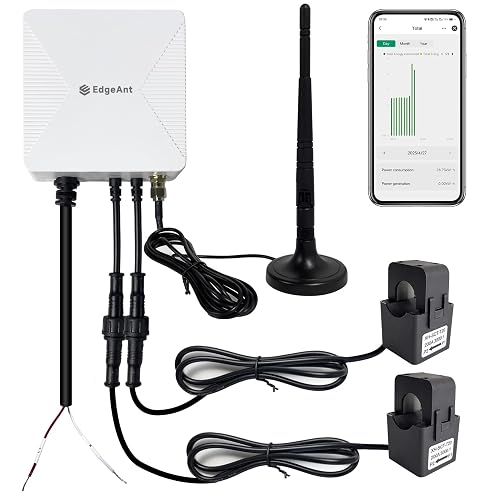 TOP CHOICEBest for whole-home clamp monitoringWiFi Energy Monitor with 2 * 200A ClampsView on Amazon
- 3
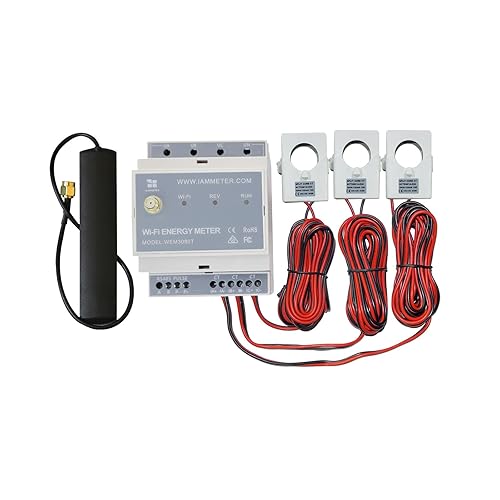 TOP CHOICEBest for three-phase serviceBi-Directional Din Rail WEM3080T Energy MeterView on Amazon
- 4
 Best budget pickSmart WiFi Energy Monitor with 3 * 80A ClampView on Amazon
- 5
 Best for home automation setupsBi-Directional Single Phase WiFi Energy MeterView on Amazon
- 6
 Best for irradiance dataSolar Power Meter (Irradiance Monitor)View on Amazon
- 7
 Best for inverter-level dataSmart Solar PV Inverter with Advanced Grid SupportView on Amazon
Our Top Picks
Quick Comparison
| Product | Best for | Key feature |
|---|---|---|
| Emporia Vue 3 Home Energy Monitor | Homeowners who want a general-purpose whole-home view | Per-circuit monitoring with solar and net metering support |
| WiFi Energy Monitor with 2 * 200A Clamps | Homes with a main panel that needs high-amperage clamps | Two 200A clamps for real-time tracking |
| Bi-Directional Din Rail WEM3080T Energy Meter | Three-phase or larger installations | Bi-directional metering with Modbus output |
| Smart WiFi Energy Monitor with 3 * 80A Clamp | Smaller homes and tight budgets | Three 80A clamps with WiFi control |
| Bi-Directional Single Phase WiFi Energy Meter | Smart home and Home Assistant users | Works with Alexa, Home Assistant and Node-RED |
| Solar Power Meter (Irradiance Monitor) | Checking sun exposure against expected output | 180-day data logging with CSV export |
| Smart Solar PV Inverter | Installers and owners who need inverter-level data | Advanced grid support functionality |
Emporia Vue 3 Home Energy Monitor
Emporia Vue 3 Home Energy Monitor – Smart Home Automation Module and Real Time Electricity Usage Monitor, Power Consumption Meter, Solar and Net Metering for UL Certified Safe Energy Monitoring
Best for: Homeowners who want a general-purpose whole-home view
This is a good starting point for a homeowner who wants to see where solar production and grid draw are going, circuit by circuit, without hiring an electrician for a complex install. It suits people who want to compare what the utility bills against what their system generated.
Key specs
- Smart home energy monitor with real-time electricity usage tracking
- Solar and net metering support, as stated in the listing
- UL-listed safety certification, per the listing
Pros
- Clear, straightforward usage tracking for everyday use
- Solar and net metering functions suit grid-tied homes
- Well-known brand in the home energy monitoring category
Cons
- Circuit-level detail depends on the clamp setup you install
- Advanced data export may require a subscription for some features
Bottom line: A sensible first choice for most homeowners who want to understand their solar and grid flows without complicated wiring.
WiFi Energy Monitor with 2 * 200A Clamps
WiFi Energy Monitor with 2 * 200A Clamps, Real-Time Electricity Tracking, Smart Home Power Management, WiFi Meter Solar/Net Metering, Home Energy Automation and Control
Best for: Homes with a main panel that needs high-amperage clamps
Owners with larger service panels, or those who want to clamp directly on the main feeds, will find the high-amperage clamp design more practical than smaller clamp kits. It fits a whole-home solar installation where grid import and export both need to be measured at the service entrance.
Key specs
- Two 200A clamps, per the listing name
- WiFi connectivity and real-time electricity tracking
- Solar and net metering support
Pros
- High-amperage clamps suit main service feeds
- Real-time tracking for both consumption and solar
- Home automation and control features
Cons
- Clamp installation at the main panel should be done by a licensed electrician
- Owners with small panels may not need this capacity
Bottom line: Best for owners whose service entrance needs high-capacity clamps and who are comfortable having a professional install them.
Bi-Directional Din Rail WEM3080T Energy Meter
Bi-Directional,Din Rail,Monitor Solar PV,Power Usage Monitor,Modbus TCP/RTU, Three Phase Energy Meter, Net Energy metering,WiFi,Split Phase,250A,WEM3080T,Home Assistant,CE,FCC,RCM
Best for: Three-phase service and larger installations
This is a DIN-rail meter designed for panel mounting rather than clamp-on use. It is aimed at installers and technically confident owners with three-phase or split-phase systems who need bi-directional measurement of import and export and integration with building systems.
Key specs
- Bi-directional net energy metering, per the listing
- Three-phase and split-phase support, per the listing
- Modbus TCP/RTU and WiFi connectivity, per the listing
Pros
- Panel-mounted design suits professional installations
- Modbus output supports integration with building management systems
- Suitable for three-phase homes
Cons
- Requires panel installation skills and proper wiring knowledge
- More complex setup than plug-in or clamp monitors
Bottom line: A strong fit for three-phase properties and installers who want a permanent, integrated meter.
Smart WiFi Energy Monitor with 3 * 80A Clamp
Smart WIFi Energy Monitor with 3 * 80A Clamp, Home Power Monitor Track Electricity in Real Time,WIFi Meter Solar/Net Metering, Home Energy Automation and Control
Best for: Smaller homes and tight budgets
Three smaller clamps make this a practical option for homes with modest service sizes or for owners who want to monitor a few major loads and the solar feed without investing in high-capacity hardware. It is a budget-friendly way into solar and net metering tracking.
Key specs
- Three 80A clamps, per the listing name
- WiFi meter with solar and net metering support
- Real-time electricity tracking and home automation control
Pros
- Lower-capacity clamps suit smaller service sizes
- Simple WiFi setup for most users
- Good entry point for monitoring solar export
Cons
- 80A clamps will not cover large main feeds
- Limited suitability for three-phase systems
Bottom line: A sensible choice for smaller single-phase homes that want affordable monitoring of solar and net flows.
Bi-Directional Single Phase WiFi Energy Meter
Bi-Directional Single Phase WiFi Energy Meter, DIN Rail, Split Core CT 150A, Solar PV Monitoring, Works with Alexa, Home Assistant, Node-RED, Modbus TCP/RTU, Lifetime Basic Cloud Service
Best for: Smart home and Home Assistant users
This DIN-rail meter with split-core current transformers is aimed at owners already running a smart home platform. Its integrations with Home Assistant and Node-RED make it a fit for people who want to build their own dashboards and automations around solar data.
Key specs
- Single-phase, bi-directional metering, per the listing
- Split-core CT rated 150A, per the listing
- Modbus TCP/RTU and cloud service, per the listing
Pros
- Works with Alexa, Home Assistant and Node-RED
- Split-core CTs can be fitted without disconnecting conductors
- Modbus support suits custom monitoring
Cons
- Setup is more involved than plug-and-play monitors
- Full benefit depends on owners who use smart home platforms
Bottom line: Best for tech-comfortable owners who want solar and grid data inside a custom smart home system.
Solar Power Meter (Irradiance Monitor)
Solar Power Meter. Measures Solar Radiation Intensity & Daily Solar Radiation Energy, 180-Day Data Logging, Real-Time Graphs & CSV Export, Solar Irradiance Monitor
Best for: Checking sun exposure against expected output
This tool measures solar radiation intensity rather than electrical flow. It helps owners compare how much sunlight their array receives with what the inverter reports, which can point to shading, soiling or orientation problems that affect the energy available for net metering credits.
Key specs
- Measures solar radiation intensity and daily radiation energy, per the listing
- 180-day data logging, per the listing
- Real-time graphs and CSV export, per the listing
Pros
- Useful for diagnosing production shortfalls
- CSV export makes comparison with utility bills straightforward
- Does not require electrical wiring
Cons
- Measures sunlight, not electrical energy, so it cannot replace a meter
- Most useful alongside an energy monitor
Bottom line: A supporting tool for owners who want to check whether low output is a weather issue or a system problem.
Smart Solar PV Inverter with Advanced Grid Support
Smart Solar PV Inverters with Advanced Grid Support Functionalities
Best for: Installers and owners who need inverter-level data
An inverter with advanced grid support functions is a core part of a solar system rather than an add-on. It is best suited to installers or owners working with a qualified installer who must meet utility interconnection requirements, since the inverter’s grid support settings often matter for approval and ongoing compliance.
Key specs
- Smart solar PV inverter with advanced grid support functionality, per the listing name
Pros
- Inverter-level data gives the most direct view of production
- Grid support functions address utility interconnection rules
- Fits professional system designs
Cons
- Not a plug-in monitor; requires professional installation
- Specific capabilities depend on utility and local rules
Bottom line: Choose this only as part of a professionally designed system that must meet your utility’s interconnection standards.
Buying Guide
Measurement Type: Clamp-On vs. DIN-Rail Meter
Clamp-on monitors wrap around conductors and are easier to install, while DIN-rail meters mount inside a panel and usually give more precise bi-directional measurement. Decide how much accuracy and permanence you need before choosing.
Good picks for this: Emporia Vue 3 Home Energy Monitor, Bi-Directional Din Rail WEM3080T Energy Meter
Phase Compatibility
Check whether your home runs single-phase or three-phase service. A monitor rated for single-phase may not capture all loads on a three-phase panel, so confirm this against your panel label or utility bill before buying.
Good picks for this: Bi-Directional Din Rail WEM3080T Energy Meter, Bi-Directional Single Phase WiFi Energy Meter
Clamp Amperage and Panel Size
Clamp ratings must exceed the current in the conductor you measure. Smaller clamps can saturate on a main feed, giving misleading readings. Match clamp rating to the service size shown on your main breaker.
Good picks for this: WiFi Energy Monitor with 2 * 200A Clamps, Smart WiFi Energy Monitor with 3 * 80A Clamp
Bi-Directional Measurement
Net metering requires tracking both energy you import from the grid and energy you export. Confirm the device explicitly lists bi-directional or net metering support, since simple consumption monitors may not separate the two flows.
Good picks for this: Bi-Directional Single Phase WiFi Energy Meter, Emporia Vue 3 Home Energy Monitor
Connectivity and Software Integration
Consider whether you want a phone app, a cloud dashboard, or integration with Home Assistant and Modbus systems. Look for CSV export or open protocols if you plan to reconcile data with utility statements.
Good picks for this: Bi-Directional Single Phase WiFi Energy Meter, WiFi Energy Monitor with 2 * 200A Clamps
Use Case: Monitoring vs. Diagnosing
If you want to see whether your system is producing what it should, an energy monitor is the core tool. If you suspect shading or dirt, an irradiance meter helps explain the gap. Many owners use both.
Good picks for this: Solar Power Meter (Irradiance Monitor), Smart Solar PV Inverter
Installation Requirements and Safety
Any device that connects to your main panel or service conductors should be installed by a licensed electrician who understands local code. Incorrect clamp placement or wiring can cause inaccurate data or create a hazard. Consult a qualified professional before installing panel-mounted hardware.
Good picks for this: Bi-Directional Din Rail WEM3080T Energy Meter, Smart Solar PV Inverter
FAQ
What does virtual net metering solar mean?
Virtual net metering solar generally refers to an arrangement where the solar generation is credited to a utility account that is not physically wired to the same location. Credits are assigned based on metered production, and owners rely on accurate measurement to verify them.
Do I need a special meter for net metering?
Many utilities require a bi-directional meter or an approved metering setup. Check your utility’s interconnection requirements before buying hardware, since the utility’s approved equipment list may control what counts for billing.
Can a clamp-on energy monitor replace my utility meter?
No. A clamp-on monitor is for tracking and insight. Billing is based on the utility’s revenue meter, and monitors are not a substitute for it.
Why do my monitor readings differ from my utility bill?
Differences can come from clamp placement, sampling intervals, billing cycle timing, or uncalibrated devices. Compare monitor data with your utility’s interval data over the same period and account for timing differences.
Is an irradiance meter useful for net metering?
It does not measure electricity, so it cannot verify credits. It can help explain why production is lower than expected by showing how much sunlight reached the array.
Do I need WiFi to use these devices?
Many monitors use WiFi for cloud dashboards and phone alerts. Some DIN-rail meters use Modbus for local integration. If you want offline logging, check whether the device stores data locally.
Should I hire an electrician for installation?
For clamp installations on the main panel and any DIN-rail or inverter work, a licensed electrician is strongly recommended. Improper wiring is a shock and fire risk, so consult a qualified professional.
Conclusion
For most homeowners exploring virtual net metering solar, the Emporia Vue 3 Home Energy Monitor is a practical starting point for everyday tracking. Owners with larger service panels should look at the 200A clamp model, while those with three-phase service or installer involvement will find the DIN-rail meter a better match. The 80A three-clamp monitor suits smaller budgets and single-phase homes, and the single-phase bi-directional meter fits smart home users. The irradiance meter and smart inverter serve as diagnostic and professional-grade tools. Match the device to your service size, phase, and how much data you actually need, and confirm compatibility with your utility before buying.
Sources
- Federal guidance on net metering, residential solar and how interconnection and metering programs generally work (energy.gov)
- Research on solar resource data, system performance and irradiance measurement (nrel.gov)
- National Electrical Code standards that govern panel work and service connections (nfpa.org)
Related reading
- What Is Virtual Net Metering? How It Works for Home Solar Owners
- How Grid-Tied Solar Works: Net Metering, Interconnection and Outages
- Xcel Solar Rewards vs Net Metering (2026): Which Should You Choose?
- Xcel Net Metering Rates: How Your Solar Credit Is Calculated (Step-by-Step)
- Xcel Energy Solar Net Metering: How It Works and How to Get Credited
- When Does Net Metering 3.0 Start? Key Dates for Home Solar Owners
- What Is the Benefit of Net Metering for Home Solar Owners?
- What Is a Net Metering Credit? How It Works for Home Solar
About Ethan Brooks
Ethan Brooks is part of our editorial team and reviews and edits our home solar guides, checking product details against manufacturer specifications and owner feedback.